


Austrian Cell Phone Plan
How to Set Up an eSIM on Android Devices
Follow these steps to set up your new eSIM on your Android device easily.
Before You Begin
- Make sure your Android device is eSIM compatible
- Ensure your Android device is carrier unlocked
- Have a stable internet connection available
Installation Methods
** Please be aware that eSIM can only be installed once. You should perform the installation under stable network connection and do not interrupt the installation process. Once installed, do not delete your eSIM after installation.
You can install your eSIM using either a QR code or manual entry:
(1) Access your eSIM details
- Log in to your account on App or Website
- Go to Numbers > Cell Phone Plans
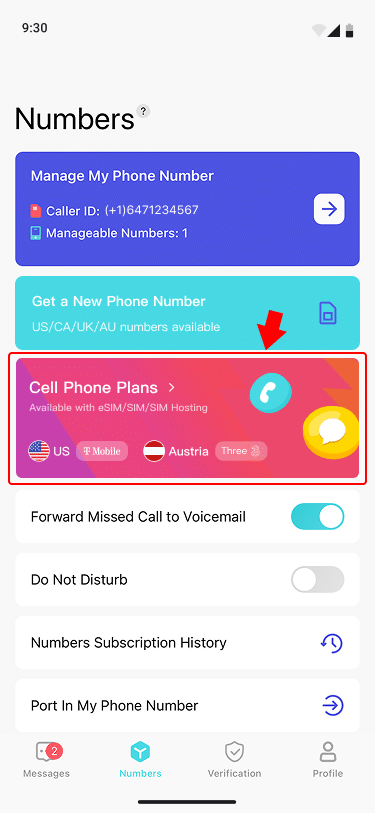
- Select your plan

- Click Installation guide under SIM Type

- Get the Installation QR code

(2) Install on your Android Device
- Option 1: QR Code Installation
- Go to Settings > Network & Internet > SIMs > + Add SIM
- Select Download a SIM instead
- Tap Next, then select Scan QR code from network
- Scan the QR code (displayed on another device or printed)
- Tap Download when prompted
- Wait for installation to complete (may take a few minutes)
- Option 2: Manual Installation
- Go to Settings > Network & Internet > SIMs > + Add SIM
- Select Download a SIM instead > Next
- At the Scan QR code from network screen, tap Need help?
- Select Enter it manually
- Enter the Activation Code from your installation guide
- Tap Continue, then Download
- Wait for installation to complete (may take a few minutes)
Final Setup
(1) Label your eSIM
- Go to Settings > Network & Internet > SIMs
- Select your newly installed eSIM
- Tap the pencil icon to rename it
- Enter a name that helps you identify this plan
- Tap Save
(2) Activate your service
- Go to Settings > Network & Internet > SIMs
- Select your newly installed eSIM
- Toggle Use SIM and Enable Roaming to activat
Your eSIM is now ready to use! Enjoy seamless connectivity for mobile data and text reception with your new eSIM service.
Need help? Contact our support team at [email protected]